
Supplier credit is one of the best tools a small shop has. When a distributor gives you 14 or 30 days to pay, you can sell the stock before you pay for it. That's free working capital.
But supplier debts can also cause real trouble: paying the same invoice twice, missing a due date and losing your credit terms, or arguing with a supplier because your records and theirs don't match. This guide shows you how to stay on top of what you owe.
Why supplier debts get messy
The usual culprits:
- Invoices on paper, kept in a drawer, a bag, or the delivery driver's book.
- Deliveries that don't match the invoice, with short deliveries or wrong items that nobody recorded.
- Payments with no reference, so you can't tell which invoice was paid.
- Part payments, where it's unclear what's still owed.
- No list of due dates, so payments happen when the supplier calls, not when they're due.
Step 1: Know your terms with each supplier
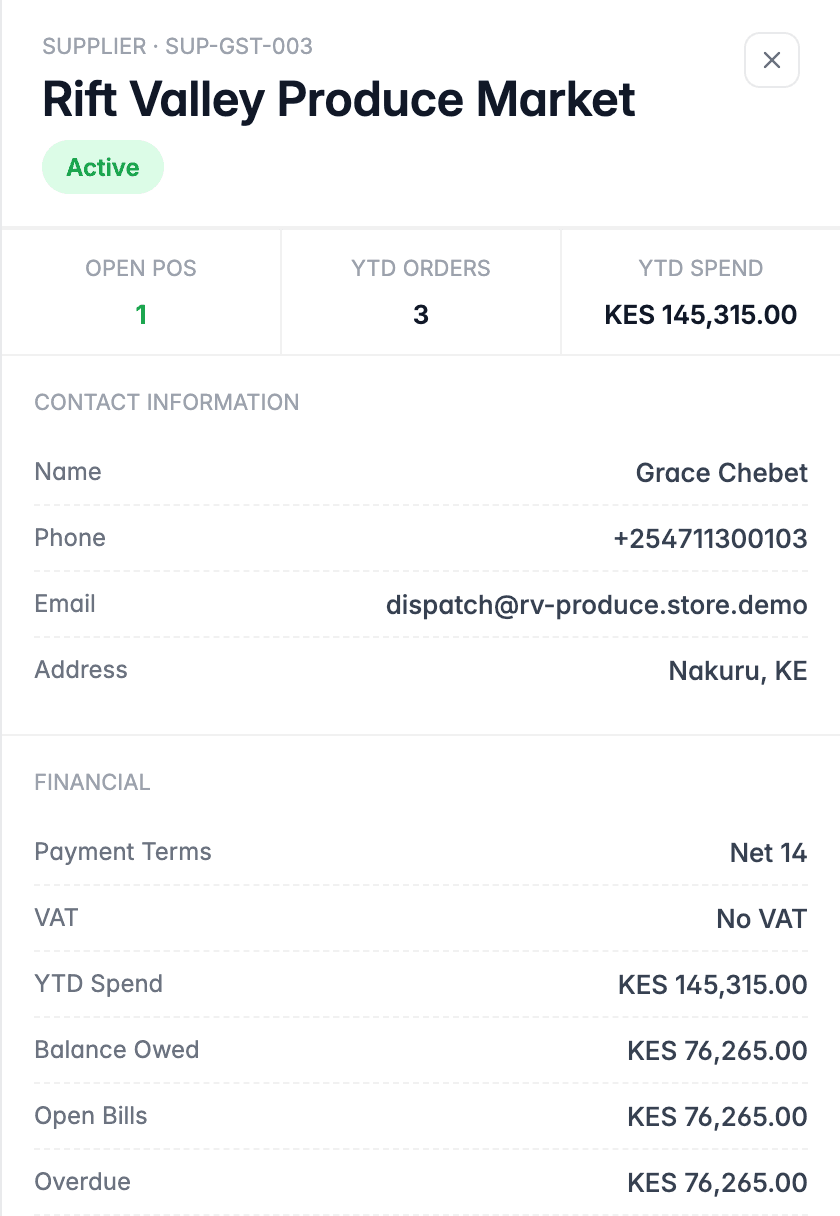
For every supplier, record:
- Payment terms: cash on delivery, 7 days, 14 days, 30 days
- How they want to be paid: M-Pesa, bank transfer, cheque
- Contact person and phone number
- Any credit limit they've set for you
Step 2: Check every delivery before you accept it
Most supplier disputes start at the back door. When stock arrives:
- Count it against the delivery note.
- Check quality and expiry dates.
- Note any shortages or damage on the delivery note, and get the driver to sign.
- Record the delivery in your system straight away, with the cost price.
This protects you from paying for goods you never received, and keeps your stock accurate. (More on this in how to manage stock in a small shop.)
Step 3: Record every bill, and match it to the delivery
When the supplier's invoice arrives, record it as a bill with:
- Supplier name and invoice number
- Invoice date and due date
- Amount
- Which delivery or purchase order it's for
Then check it matches what you actually received. If the invoice says 50 cartons and you received 45, sort it out before you pay.

Step 4: Plan payments by due date
Once all your bills are recorded, you can see what's due and when. A payables ageing view groups what you owe by how overdue it is:

Use it to:
- Pay on time, not early and not late. Paying early gives away free credit; paying late damages the relationship.
- Prioritise. If cash is tight, talk to suppliers before the due date. Most will agree a plan if you're honest early.
- Avoid surprises. Check next week's due payments every Monday, so you can keep enough cash or M-Pesa float.
Step 5: Record every payment against specific bills
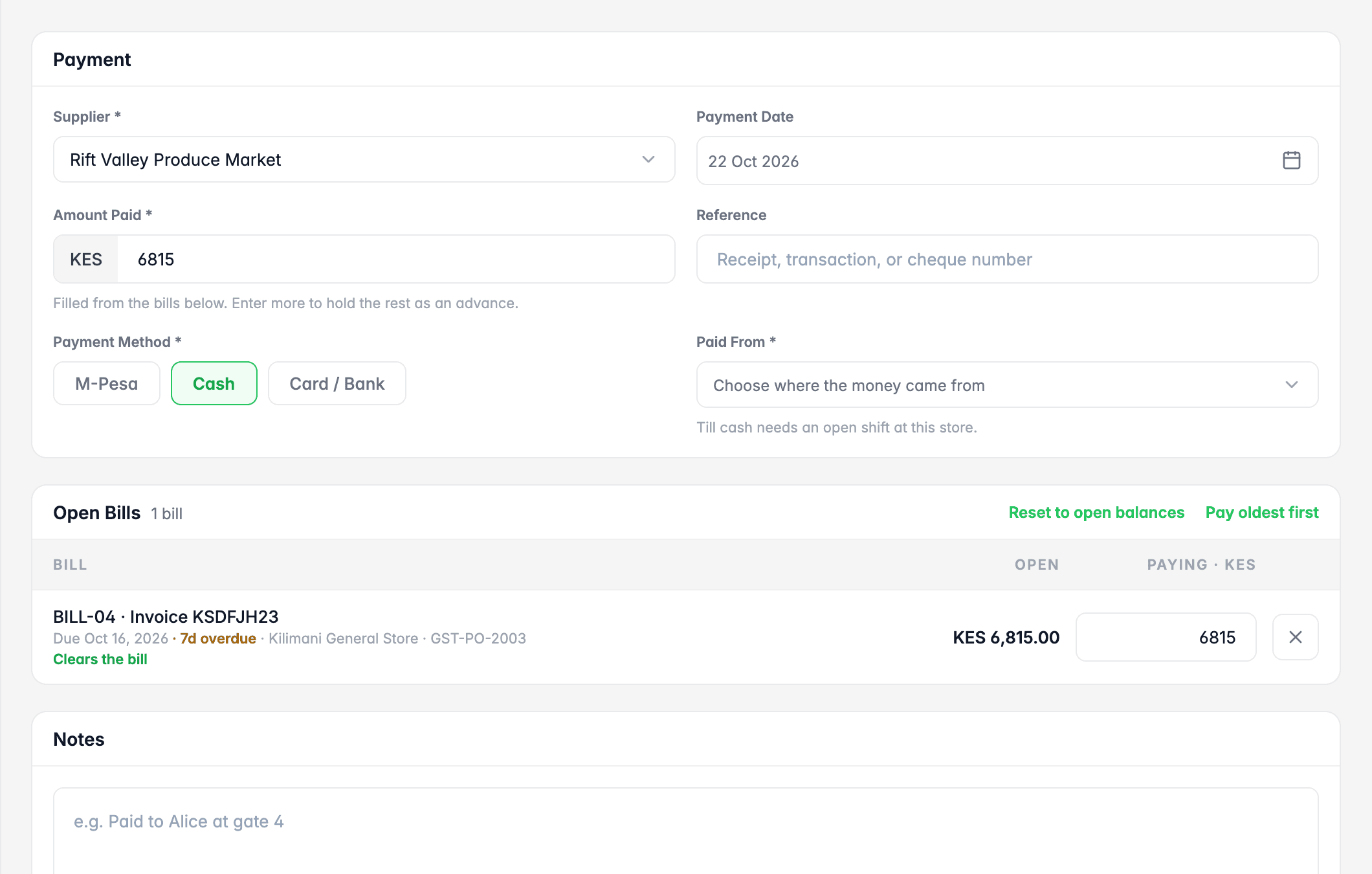
When you pay, record:
- The amount and date
- The payment method (M-Pesa, bank, cash) and where the money came from
- The reference, such as the M-Pesa code or bank transaction number
- Which bills the payment covers
Part payments
If you can only pay part of a bill, record the part payment against it. The remaining balance stays open, so there's no confusion about what's still owed.
Returns and credit notes
If you return damaged or expired goods, ask the supplier for a credit note and record it. It reduces what you owe, so make sure it's applied before your next payment.
Step 6: Reconcile with supplier statements monthly
Many suppliers send a monthly statement listing invoices, payments and the balance they think you owe. Compare it with your own records:
- Invoices on their statement that you don't have? Ask for a copy. It may be a delivery you didn't record.
- Payments you made that they haven't recorded? Send them the M-Pesa or bank reference.
- Credit notes missing? Follow them up.
Doing this monthly keeps small differences from turning into big disputes.
A simple weekly routine
| When | Task |
|---|---|
| Every delivery | Count, check, record the delivery |
| When invoices arrive | Record as bills, match to deliveries |
| Monday | Review bills due this week; plan cash |
| Payment day | Pay and record each payment against its bills, with references |
| Month end | Reconcile each supplier's statement |
Common mistakes to avoid
- Paying from the invoice alone, without checking the delivery.
- Paying in cash without a receipt or reference.
- Letting staff pay suppliers from the till without recording it.
- Ignoring small balances. They add up and cause disputes.
- Waiting for the supplier to chase you. Plan payments yourself.
The bottom line
Supplier credit is valuable. Treat it with care and suppliers will keep extending it. Record every delivery and bill, pay by due date with clear references, and reconcile monthly. You'll avoid double payments and disputes, and you'll always know exactly where you stand.
The other side of the ledger is what customers owe you. See how to keep track of customers who buy on credit, and for how it all comes together in your profit, read sales vs profit.