
Plenty of businesses start with Excel, Google Sheets, or a notebook, and that's a sensible place to start. Spreadsheets are cheap, flexible, and most people already know how to use them.
But as a business grows, the spreadsheet that once helped can start holding you back. This guide gives an honest comparison of spreadsheets and POS software, so you can decide what's right for your business today.
What Excel does well
Let's be fair to the spreadsheet. It's good at:
- Low cost. You may already have it, or you can use Google Sheets for free.
- Flexibility. You can track anything, any way you like.
- Analysis. Once data is in, Excel is great for one-off calculations, charts and what-if planning.
- Small, simple operations. One person, few products, few sales a day: a spreadsheet can genuinely be enough.
Where Excel struggles in a shop
The problems appear when a spreadsheet becomes your system, rather than a tool.
1. Someone has to type everything
Every sale, every delivery, every payment has to be entered by hand. On a busy day, that doesn't happen at the counter. It happens at night, from memory and scraps of paper, if it happens at all.
2. Stock levels are always out of date
Because stock only changes when someone updates the sheet, the numbers drift. You find out you're out of sugar when a customer asks for it.
3. Mistakes are easy and hard to find
One wrong formula, a deleted row, or a typo in a price, and your totals are wrong. Spreadsheets don't warn you, and errors can go unnoticed for months.
4. No link to M-Pesa or the till
Payments come in by M-Pesa and cash, but the spreadsheet doesn't know about them. Matching payments to sales means scrolling through messages and statements by hand.
5. Weak control over staff
Anyone with the file can change anything, including past sales. There's no record of who changed what, and no way to limit what each person can do.
6. One file, one place
A spreadsheet on the shop computer can't easily be updated from the counter, the store room, and your phone at the same time, and if the computer dies without a backup, your records go with it.
What POS software does differently
A POS system records the sale as it happens, at the counter. Everything else follows from that:
- Stock updates automatically with every sale and delivery.
- Payments are recorded with the sale, including M-Pesa.
- Reports are instant: sales, profit, best sellers, low stock, without building formulas.
- Each staff member has their own login, with permissions and a record of what they did.
- Data is backed up, and you can check your shop from your phone.

Side-by-side comparison
| Excel / spreadsheet | POS software | |
|---|---|---|
| Recording sales | Typed in by hand, often later | Recorded at the counter as it happens |
| Stock levels | Updated manually, often out of date | Updated automatically with every sale |
| M-Pesa | Matched by hand | Linked to each sale |
| Profit reports | Build and maintain your own formulas | Ready-made, always current |
| Staff control | Anyone can edit anything | Separate logins, permissions, activity log |
| Mistakes | Easy to make, hard to spot | Fewer manual steps, fewer errors |
| Works when offline | Yes, on one computer | Good systems keep selling offline, then sync |
| Upfront cost | Free or very low | Monthly subscription, possibly hardware |
| Best for | Very small, simple businesses | Growing shops with staff and stock |
Signs you've outgrown your spreadsheet
It's probably time to switch if:
- You spend more than an hour a day updating records
- Your stock numbers rarely match what's on the shelf
- Cash-ups don't balance, and you can't work out why
- You can't quickly say which products make the most profit
- You have staff selling, and you want to know who sold what
- You want to check the shop when you're not there
If you're nodding at two or more of these, a POS will likely pay for itself in time saved and losses avoided. See how much a POS system costs in Kenya to budget for it.
Switching doesn't mean starting from scratch
The good news: the work you've put into your spreadsheet isn't wasted. Your product list, prices and stock levels can usually be imported straight into a POS.
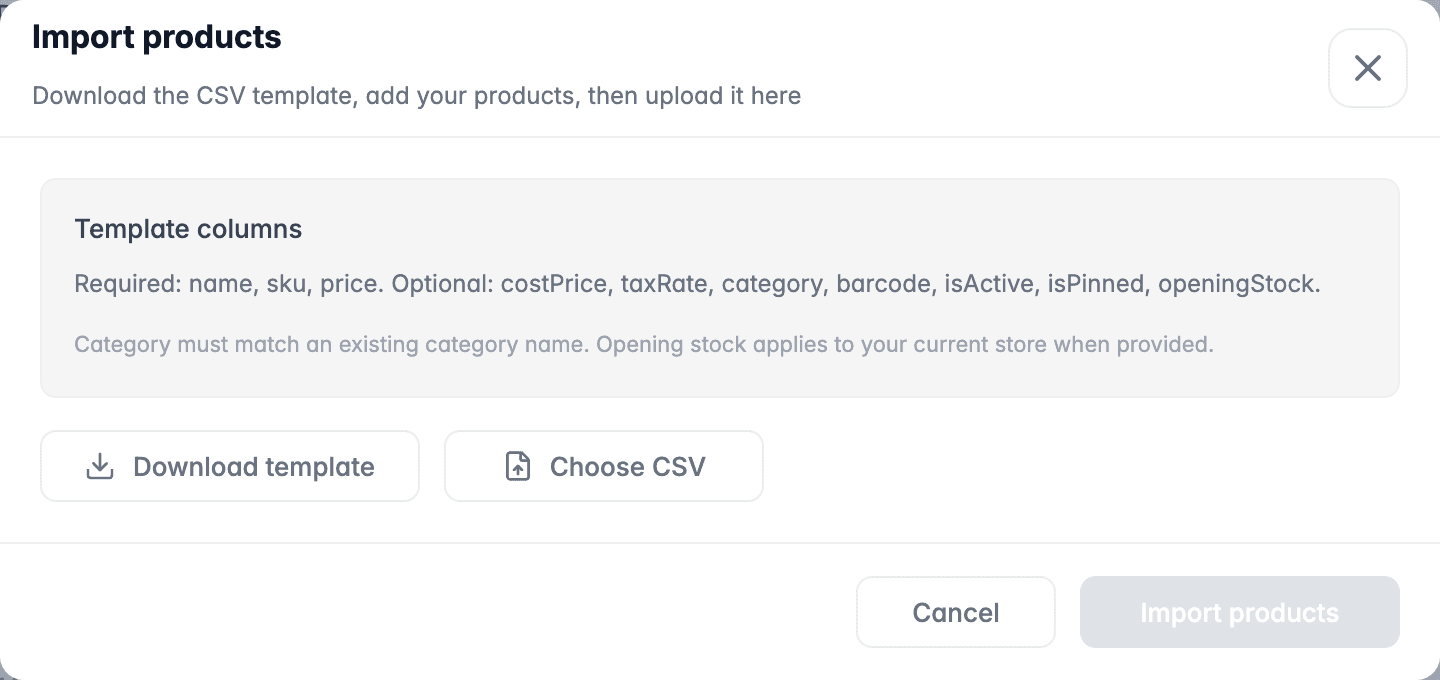
To switch smoothly:
- Clean up your product list in Excel: remove duplicates, check names and prices.
- Save it as CSV and import it into the POS.
- Do a stock count on the day you start, so opening stock is accurate. Our stock taking guide helps.
- Run both for a week if it makes you comfortable, then retire the spreadsheet.
- Keep Excel for analysis. Most POS systems let you export reports, so you can still use spreadsheets for planning.
So, which is better?
- For a very small business with one person, few products and few daily sales, Excel can be enough, as long as you're disciplined about updating it.
- For a shop with staff, stock and steady daily sales, POS software is better. It saves time, reduces mistakes, and gives you numbers you can trust.
Excel isn't the enemy; it just isn't designed to run a shop counter. Use the right tool for each job.
When you're ready to compare systems, start with our 10 questions to ask before you buy a POS.